Free online tool for online sellers
Free Kit & Bundle Inventory Planner
Plan stock for products you sell as kits, bundles and single spare parts. Tell it what goes into each kit, and see what to order, when you will run short, and what it will cost.
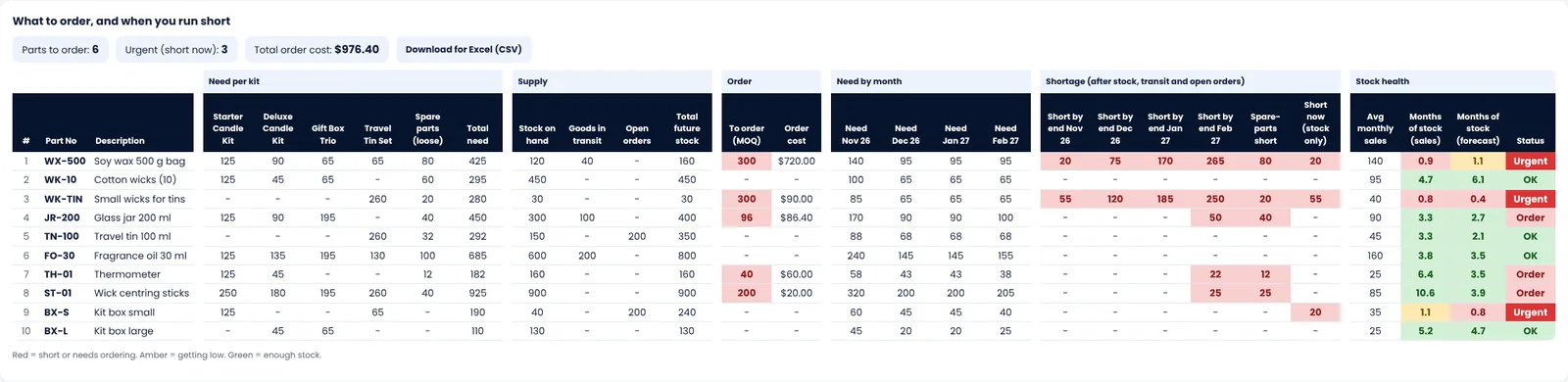
Why a normal stock sheet breaks when you sell kits
When you sell a bundle, one sale uses several parts at once. Some of those parts are in other kits too, and some are sold on their own as spare parts. A simple stock list cannot see that, so you find out you are short of one small part after the kits are already sold.
This planner works the way replenishment planners do it in real supply chains: it breaks every kit into its parts (a bill of materials), adds the parts sold on their own, then compares the total need with your stock, open orders and shipments on the way, month by month.
Who it is for
Etsy and Shopify sellers
Gift sets, craft kits, starter packs and bundles built from the same parts.
Small product brands
Subscription boxes, multipacks and product lines that share packaging or components.
Parts and spares sellers
Businesses that sell complete kits and also replacement parts on their own.
What the planner does
Bill of materials per kit
Set how many of each part go into one kit. Change a kit plan and every part updates.
Shortage month by month
See the month each part runs out, not just the total. Red means short.
Goods in transit
Up to three shipments, each counted only from the month it arrives.
Order quantity and cost
Orders round up to the supplier's minimum order quantity, with the total cost.
Reorder point and safety stock
Worked out from average sales, lead time and safety days for every part.
Months of stock
How long stock lasts at past sales and at your forecast, in red, amber or green.
How it works
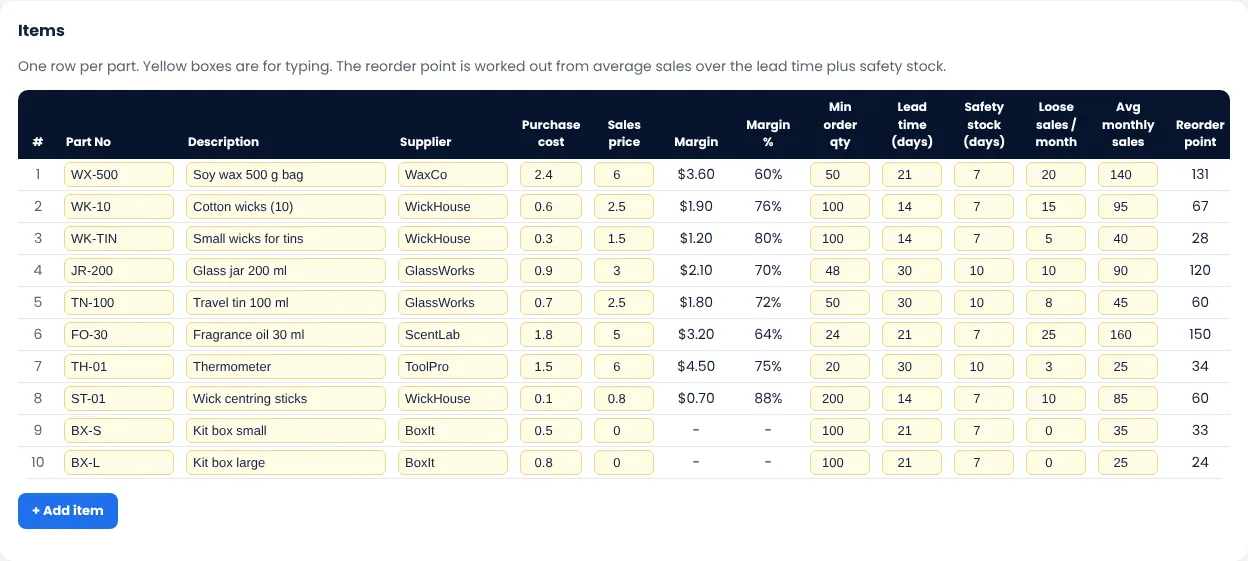
1. Add your parts
Part number, supplier, purchase cost, sales price, minimum order quantity, lead time and safety stock. Margin and reorder point are calculated for you.
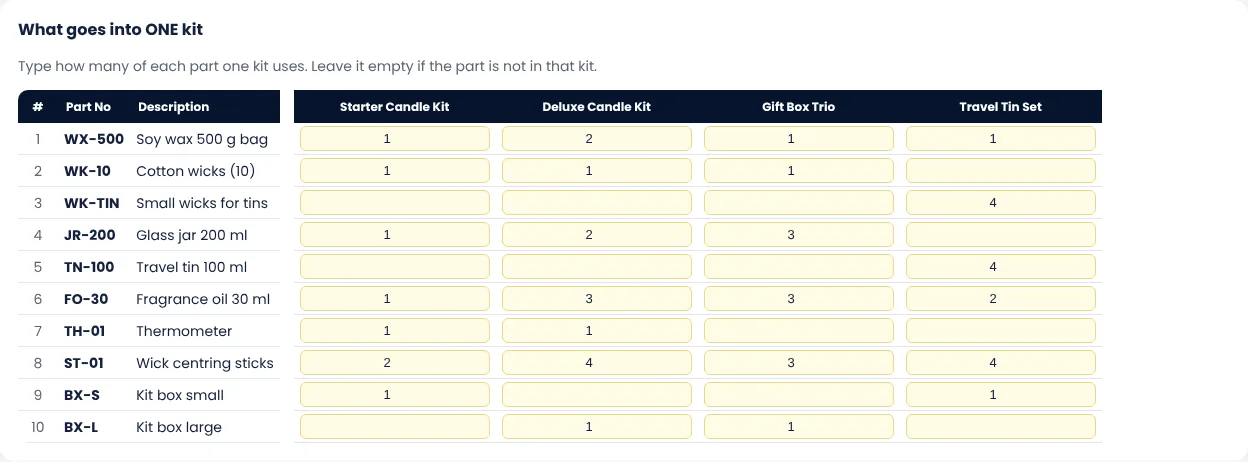
2. Build your kits
Type how many of each part go into one kit. The planner shows each kit's parts cost and margin.
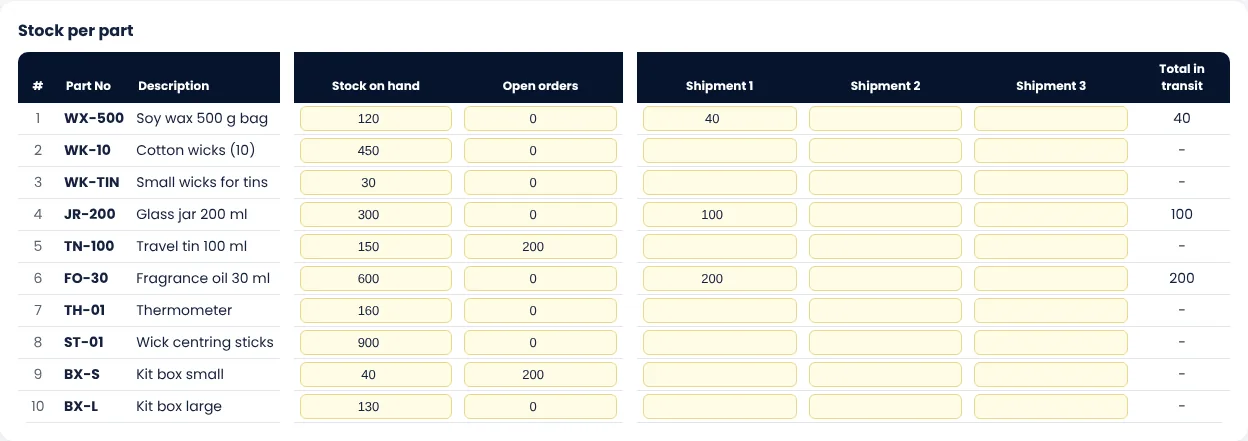
3. Enter stock and shipments
Stock on hand, open orders, and what is in each shipment on the way, with its arrival month.
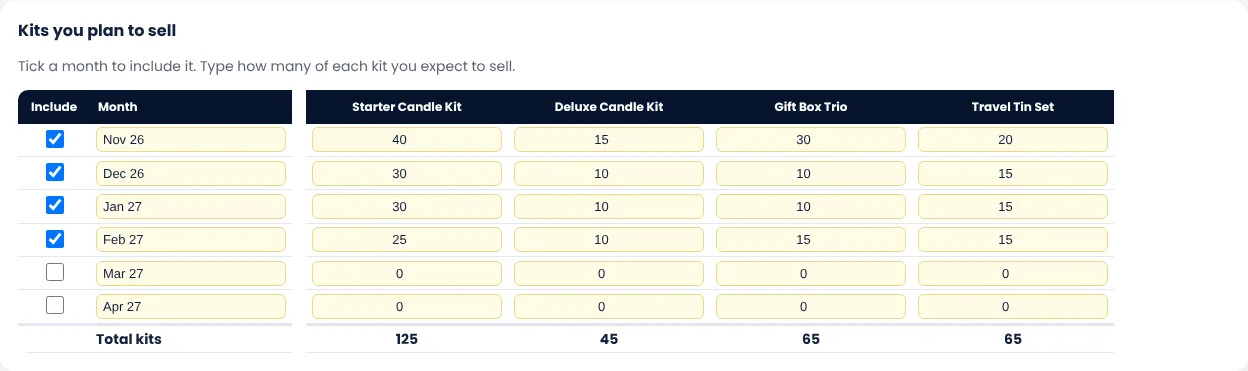
4. Plan your kit sales
Type how many kits you expect to sell each month. The planner shows what to order and when you will run short.
How the planner calculates what to order
- Need per part = (parts per kit × kits planned, for every kit) + loose spare-part sales.
- Total future stock = stock on hand + open orders + goods in transit.
- To order = need − total future stock, rounded up to the minimum order quantity.
- Short by end of month = need up to that month − (stock + open orders + shipments arrived by then).
- Reorder point = average daily sales × (lead time + safety stock days).
- Months of stock = stock on hand ÷ average monthly sales.
Built by a supply chain replenishment planner, based on the spreadsheet method used at work to restock kits and spare parts.
Frequently asked questions
What is a kit or bundle inventory planner?
It is a stock planner for products you sell as a set of parts. You list which parts go into each kit (a bill of materials), and it works out how many of each part you need for the kits you plan to sell, plus any parts you sell on their own.
Is the planner free?
Yes. The planner is free to use. You sign in with Google so your data is saved online and stays private to you.
How is the reorder point worked out?
Reorder point = average daily sales × (lead time in days + safety stock in days). Average daily sales is your average monthly sales divided by 30.
Does it count stock that is still on the way?
Yes. Add up to three shipments of goods in transit and pick the month each one arrives. Each shipment only counts as stock from its arrival month, so the month-by-month shortage stays realistic.
Can I sell the same part in a kit and on its own?
Yes. Each part has a loose sales per month figure for spare parts sold on their own. The planner adds them to the kit demand and shows a separate spare-parts shortage.
Does it round orders up to the minimum order quantity?
Yes. If a supplier has a minimum order quantity (MOQ), the order is rounded up to the next full MOQ and the order cost is worked out from your purchase price.
Can I use it in Excel?
Yes. The Download for Excel button saves your planner as a CSV file that opens in Excel or Google Sheets.
Who can see my data?
Only you. Your planner is linked to your Google account. We only use your name and email to sign you in.
Start planning your kit stock
Free, private to you, and it comes with example data so you can see how it works first.
Start free with Google